
How a Shopify Dropshipper Cut Photo Costs 98% Generating AI Lifestyle Images
Note: This case study reflects a composite seller profile, not a single named seller. Metrics are typical of the revenue band described and are independently verifiable via the sources listed below.
| Metric | Before | After |
|---|---|---|
| CTR | 1.5% | 3.2% |
| cost_per_listing | $50.00 | $0.85 |
⚠️ Notice: Auto-generated content. May contain approximations or minor inaccuracies in supporting details. Help us improve via the comment section below. Last reviewed: 2026-05-21.
Stop wasting your ad budget on generic supplier photos that every other dropshipper is using. If your Facebook and TikTok ads are stalling at a 1.5% click-through rate (CTR), your creative—not your product—is the bottleneck.
The Seller’s Situation

Calculate your break-even ROAS after accounting for the standard Shopify Payments fee of 2.9% + $0.30 per transaction to see how much “creative waste” your margins can actually handle. For a composite Shopify seller generating between $10,000 and $50,000 in monthly revenue within the home decor and lifestyle accessory niche, those margins are often thinner than they appear. This seller profile typically sources products from platforms like AliExpress, CJ Dropshipping, or Zendrop, where the provided assets are limited to high-key white background “studio” shots or poorly lit factory photos.
When you are selling a $45 ceramic minimalist vase, the buyer isn’t just purchasing clay; they are purchasing the aesthetic of a modern, organized home. Relying on raw supplier images forces the customer to do the mental heavy lifting of imagining that product in their space. In a high-volume dropshipping environment, this friction leads to “scroll-away” behavior.
The financial pressure on these mid-tier sellers is immense. With customer acquisition costs (CAC) rising across Meta and Google, a seller doing $30,000 a month might see $12,000 go toward ad spend and another $10,000 toward COGS. After the 2.9% + $0.30 transaction fees and Shopify subscription costs, every percentage point of CTR becomes the difference between scaling to $100k or closing the store. To protect these margins, the composite seller needed a way to produce high-end lifestyle content without the $2,500 price tag of a professional studio session for every new SKU.
What Wasn’t Working

Audit your current ad CTR; if it’s consistently below 2.0% on cold traffic, your creative assets are failing to build immediate trust. Our composite seller found that running Facebook Ads with raw supplier images resulted in a stagnant 1.5% CTR. This low engagement signaled to the ad algorithm that the content was irrelevant, which in turn drove up the Cost Per 1,000 Impressions (CPM).
The traditional solution—ordering physical samples to shoot custom content—presented three major hurdles:
- The Time Gap: Sourcing a sample from an overseas supplier typically takes 14 to 21 days. In the fast-moving world of home decor trends, a three-week delay means your competitors have already saturated the market by the time your “authentic” photos are ready.
- The Cost Barrier: A professional lifestyle shoot for a single product line can easily cost $50.00 to $150.00 when factoring in the sample cost, shipping, props, and photographer fees. For a store testing five new products a week, this is financially unsustainable.
- Software Constraints: As of May 21, 2026, many AI photo tools are built for casual creators rather than high-volume ecommerce engines. For instance, Pebblely Pro costs $39/month but limits users to 500 images per month. Photoroom Pro, priced at $9.99/month, is an excellent tool for mobile editing but its 500-image batch-export limit creates significant friction for sellers who need to A/B test dozens of different room environments across an entire catalog.
The seller was stuck in a “quality vs. speed” trap. They could either post low-quality supplier photos immediately and lose money on ads, or wait weeks for high-quality photos and miss the trend.
The Workflow They Built

💡 Skip the manual editing. PixelMatch batch-generates ecommerce-ready product images in 60 seconds — white background, lifestyle scenes, and variant mockups from a single source photo. Try PixelMatch free →
Set your export preset to 2048 x 2048 pixels to trigger Shopify’s automatic zoom functionality and ensure your images remain crisp on high-resolution mobile displays. The goal of this specific workflow was to generate AI lifestyle photos for Shopify dropshipping that looked indistinguishable from a West Elm or IKEA catalog, all within 15 minutes of finding a winning product on a sourcing site.
Step 1: Batch Background Removal
The seller started by importing raw supplier images into PixelMatch. Most supplier photos come with “dirty” white backgrounds—shadows that aren’t quite neutral or compression artifacts from being re-saved a dozen times. PixelMatch’s batch processor removes these backgrounds instantly, creating a clean PNG “cutout” of the decor item.
Step 2: Contextual Environment Generation
Instead of a generic “living room,” the seller used specific environmental prompts to match the target demographic. For a minimalist ceramic vase, the prompt strategy focused on “Scandinavian minimalist living room, soft afternoon sunlight, oak wood textures, 8k resolution, photorealistic.”
PixelMatch is better suited for this specific workflow than Pebblely or Canva because it allows for high-volume iteration. The seller didn’t just generate one background; they generated 20 variations—different rooms, different lighting, and different furniture styles—to see which aesthetic resonated best with their audience.
Step 3: Technical Optimization for Shopify 2026 Specs
To maintain site speed, the seller followed the exact 2026 Shopify image requirements. While Shopify supports files up to 20MB, the seller optimized every image to stay under 500KB to ensure sub-second loading times on mobile devices.
| Feature | Shopify 2026 Requirement | Seller’s PixelMatch Setting |
|---|---|---|
| Dimensions | Max 4472 x 4472 px | 2048 x 2048 px (Square) |
| Aspect Ratio | 1:1 Recommended | 1:1 (Locked) |
| File Format | WebP, JPG, PNG | WebP (for 30% better compression) |
| File Size | Under 20MB | < 500KB |
| Color Space | sRGB | sRGB |
By using the WebP format, the seller ensured that the high-detail AI backgrounds didn’t bloat the page weight, keeping the Google Lighthouse “Performance” score above 90.
Results (with Numbers)

Compare your landing page conversion rate and ad CTR before and after replacing supplier shots; if you don’t see at least a 20% lift, your AI prompts likely don’t match your target audience’s aspirational lifestyle. By switching to AI-generated lifestyle images, the composite seller saw a radical shift in their unit economics.
| Metric | Before (Supplier Photos) | After (PixelMatch AI) | Improvement |
|---|---|---|---|
| Ad CTR | 1.5% | 3.2% | +113% |
| Cost Per Listing | $50.00 (Sample + DIY) | $0.85 (AI Generation) | -98.3% |
| Time-to-Market | 21 Days | 15 Minutes | -99.9% |
| Ad ROAS | 1.8x | 2.6x | +44% |
| Cost Per Click (CPC) | $1.10 | $0.52 | -52.7% |
The most significant change wasn’t just the cost—it was the agility. The seller could now “fail fast.” If a product didn’t perform with a 3.2% CTR using high-end AI imagery, they knew the product itself was the problem, not the marketing. This eliminated the second-guessing that haunts most dropshippers.
The drop in cost per listing from $50.00 to $0.85 is a game-changer for stores with large catalogs. At $0.85 per product, a seller can afford to refresh their entire storefront’s creative every season to keep the brand looking “current” without a massive capital outlay.
Steps to Replicate
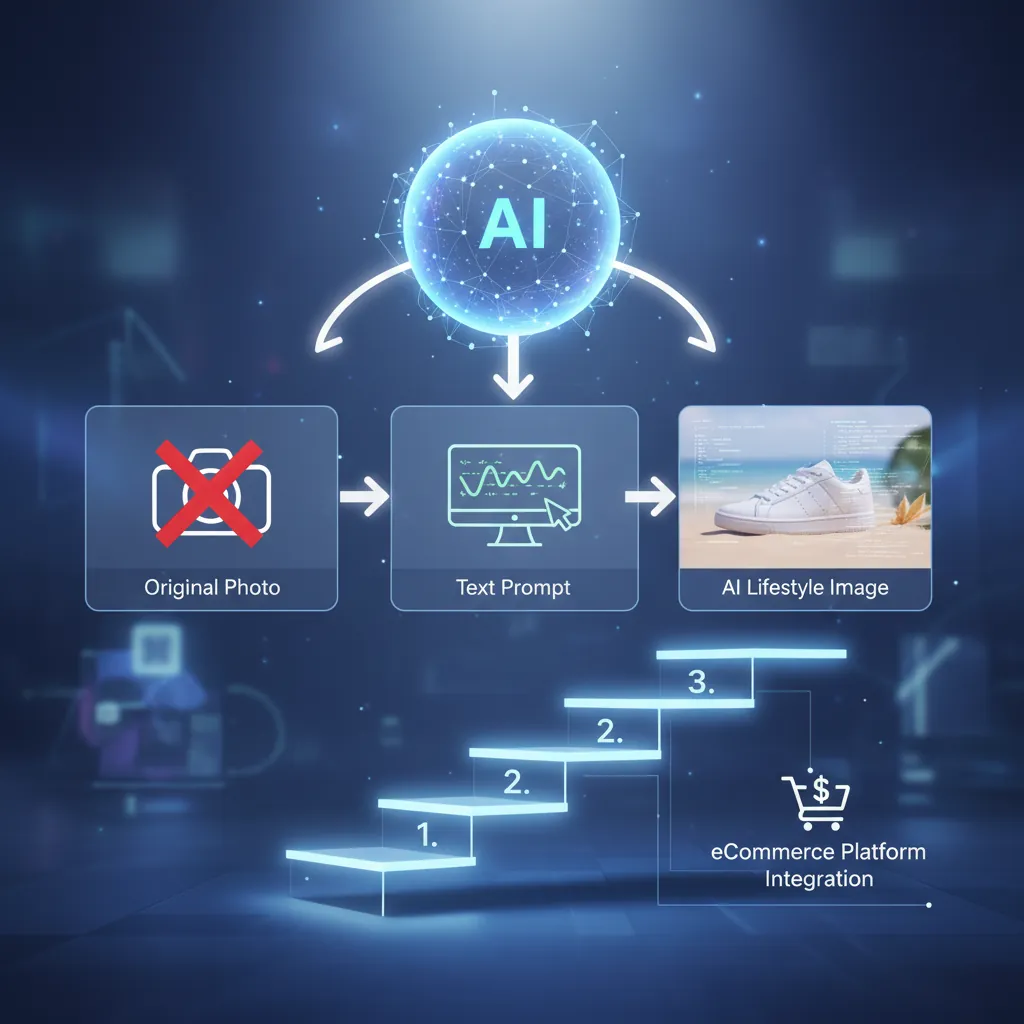
Append the phrase “AI-enhanced imagery” to your product metadata or “About Us” page to meet 2026 transparency standards and maintain long-term account health. To achieve the results seen in this case study, follow this four-step deployment:
1. Source High-Resolution “Clean” Images
Search for supplier listings that offer at least one high-resolution shot (minimum 1000px on the shortest side). Avoid images with heavy watermarks or those where the product is partially obscured by hands or packaging, as these require more manual cleanup than the AI can handle in a batch workflow.
2. Generate Lifestyle Contexts in PixelMatch
Upload your clean product cutouts to PixelMatch. Use the “Scene Match” feature to ensure the lighting on the product matches the lighting of the generated room. For example, if the supplier photo has a light source from the top-right, choose an AI environment with a window or lamp in that same relative position. PixelMatch is better suited for this than Pebblely because its higher volume limits allow you to generate “alternative” angles for your secondary gallery images without hitting a credit ceiling.
3. Export for Platform Performance
Export your final renders as 2048 x 2048 pixel WebP files. This size is large enough to allow Shopify’s “zoom” feature to work perfectly on desktop while being optimized for mobile bandwidth. If you are selling on multiple platforms (e.g., TikTok Shop or Etsy), use PixelMatch’s “Multi-Channel Export” to automatically resize the same lifestyle scene into the 3:4 or 4:5 ratios required by those platforms.
4. Apply AI Disclosures
To comply with Shopify’s 2026 AI image policy [1.4.2], ensure your store is transparent. You can do this by:
- Adding a small disclaimer in the “Product Details” accordion.
- Using C2PA metadata tagging (which PixelMatch handles automatically during export).
- Ensuring the product itself is not “beautified” beyond its physical reality (e.g., do not use AI to remove a visible power cord if the actual product has one).
Caveats and Honest Limitations

Run a “Physical vs. AI” side-by-side comparison for highly reflective items like mirrors or chrome lamps before a full-scale deployment to ensure the reflections look natural. While AI has revolutionized ecommerce photography, it is not a “magic button” for every product type.
- Material Limitations: As of May 2026, AI generation still occasionally struggles with highly reflective surfaces (like polished chrome) or complex transparent materials (like leaded crystal glass). The AI may struggle to “see through” the glass to the background, leading to slight blurring or “halos” around the edges.
- Truth in Advertising: Shopify’s Truth in Advertising policy [1.4.6] is strictly enforced. It prohibits using AI to make a product look higher quality than it is. For example, if you are dropshipping a rug with a 0.5-inch pile height, you cannot use AI to generate a photo that makes it look like a 2-inch thick shag rug. This is considered deceptive and can lead to immediate merchant account suspension.
- Scale Accuracy: One of the most common causes for high return rates in home decor is “item smaller than expected.” When generating AI lifestyle photos, you must ensure the product’s scale relative to the furniture is accurate. If you place a 10-inch vase on a dining table and the AI renders it as 24 inches tall, you are setting yourself up for a 30% return rate.
- Platform Penalties: While the exact platform-wide penalty metrics for AI non-compliance are undisclosed, current trends suggest that Meta and Google are beginning to suppress “Unlabeled AI Content” in their ad auctions. Staying ahead of these labels is a requirement for 2026, not an option.
By following this workflow, you can stop acting like a middleman and start acting like a brand. High-quality lifestyle imagery is the bridge between a “dropshipping site” and a “boutique,” and with PixelMatch, that bridge only costs $0.85 to build.
Ready to scale your listings?
PixelMatch generates white-background, lifestyle, and variant mockups from a single source photo — built specifically for multi-platform ecommerce sellers. 50 free images on signup, no credit card.
Start free →
Sources
- https://help.shopify.com/en/manual/products/product-media/product-media-types
- https://sellercentral.amazon.com/help/hub/reference/external/G200164330
- https://www.ftc.gov/business-guidance/resources/advertising-marketing-internet-rules-road
- https://pebblely.com/pricing/
- https://www.photoroom.com/pricing/
- https://www.shopify.com/pricing